Construction, contracting and infrastructure
Site OS
An integrated system for managing construction sites, field teams and documents with AI.
Managing work sites, teams, technical documents, clients, attendance and working hours in one platform that connects the site with the office. Site OS combines field operations management, document management and AI automation of administrative procedures, giving contracting companies a complete view of their work across different sites and projects.

- Client
- An Italian contracting company
- Industry
- Construction, contracting and infrastructure
- Services
- Software development
- AI and business automation
- Platforms
- iOS and Android app
- Web admin panel
- Client portal
- API
The challenges the system addresses
As projects and work sites multiply, it gets harder to keep track of teams, technical documents, client requirements and working hours. When this information is spread across files, messages and different systems, coordination between the site and the office becomes more complicated.
Do you face these problems in your company too?
Project, client and technical documents are spread across different folders and files.
It is hard to reach the latest version of site documents when they are needed.
Timesheets arrive late, and staff have to enter working hours by hand.
It is hard to verify actual and overtime hours when preparing payroll.
Team assignments change without a central record of where workers are deployed.
Entering data from IDs, permits and worker documents takes a long time.
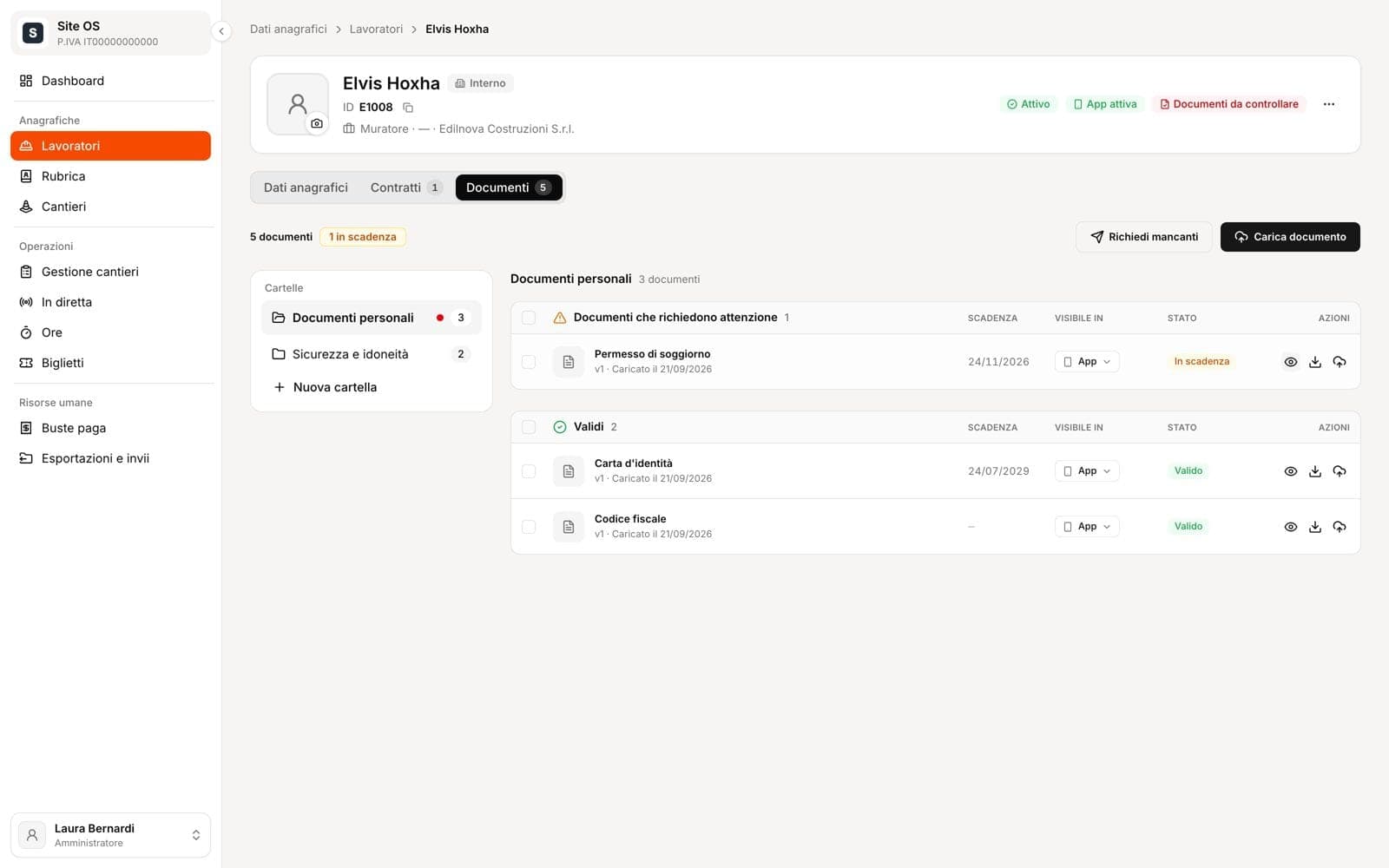
Expired documents are discovered only when they are needed.
Clocking in breaks down at sites with no internet coverage.
Who is Site OS designed for?
Construction and contracting companies
Managing work sites, teams, technical documents and administrative operations.
Installation and technical works companies
Organizing technician assignments and tracking project documents and working hours.
Maintenance and renovation companies
Managing teams moving between client sites and tracking the documents linked to each site.
Road and infrastructure companies
Coordinating work across multiple projects and remote sites, even without an internet connection.
Companies with a multinational workforce
A multilingual app with central management of worker documents and AI processing of their data.
How does the system work?
Integrated management of work sites and clients
Each site and client has its own file bringing together the related information, documents and teams, making it easier to follow projects from one place.
Technical and administrative document management
Organizing project documents, drawings, technical files and client and worker documents in a central archive, with version management and access to documents when needed.
Clock-in and clock-out
The worker clocks in from the phone using GPS within the site’s set boundaries, or with an NFC card. The site supervisor can clock in the team.
Clock-in without internet
The app keeps clock-in and clock-out records and sends them automatically when the connection returns.
With solutions like this
-50%
Less administrative work after digitizing timesheets and site forms.
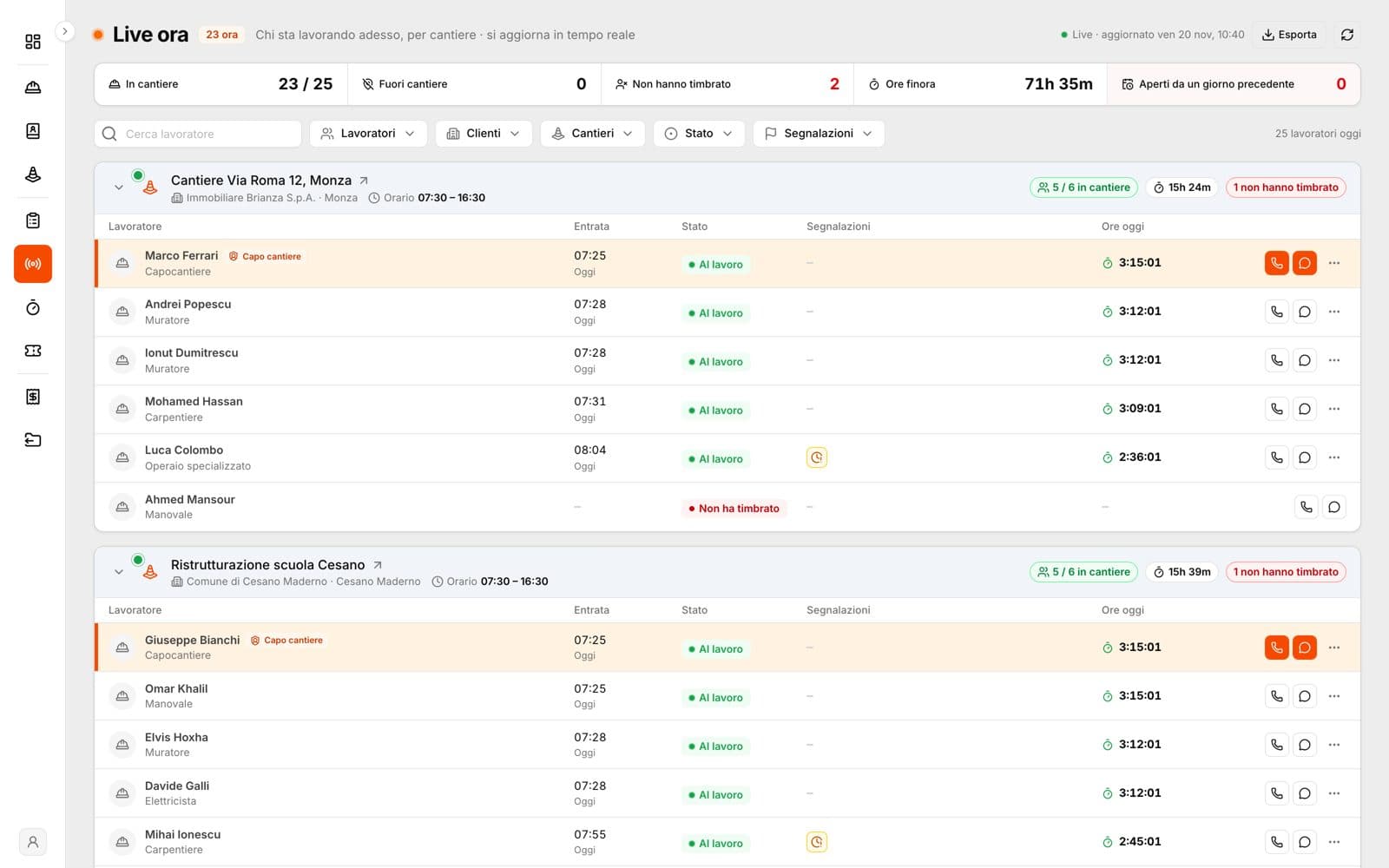
Tracking field operations
The office sees which workers have started work at each site, their arrival times and the records that need review.
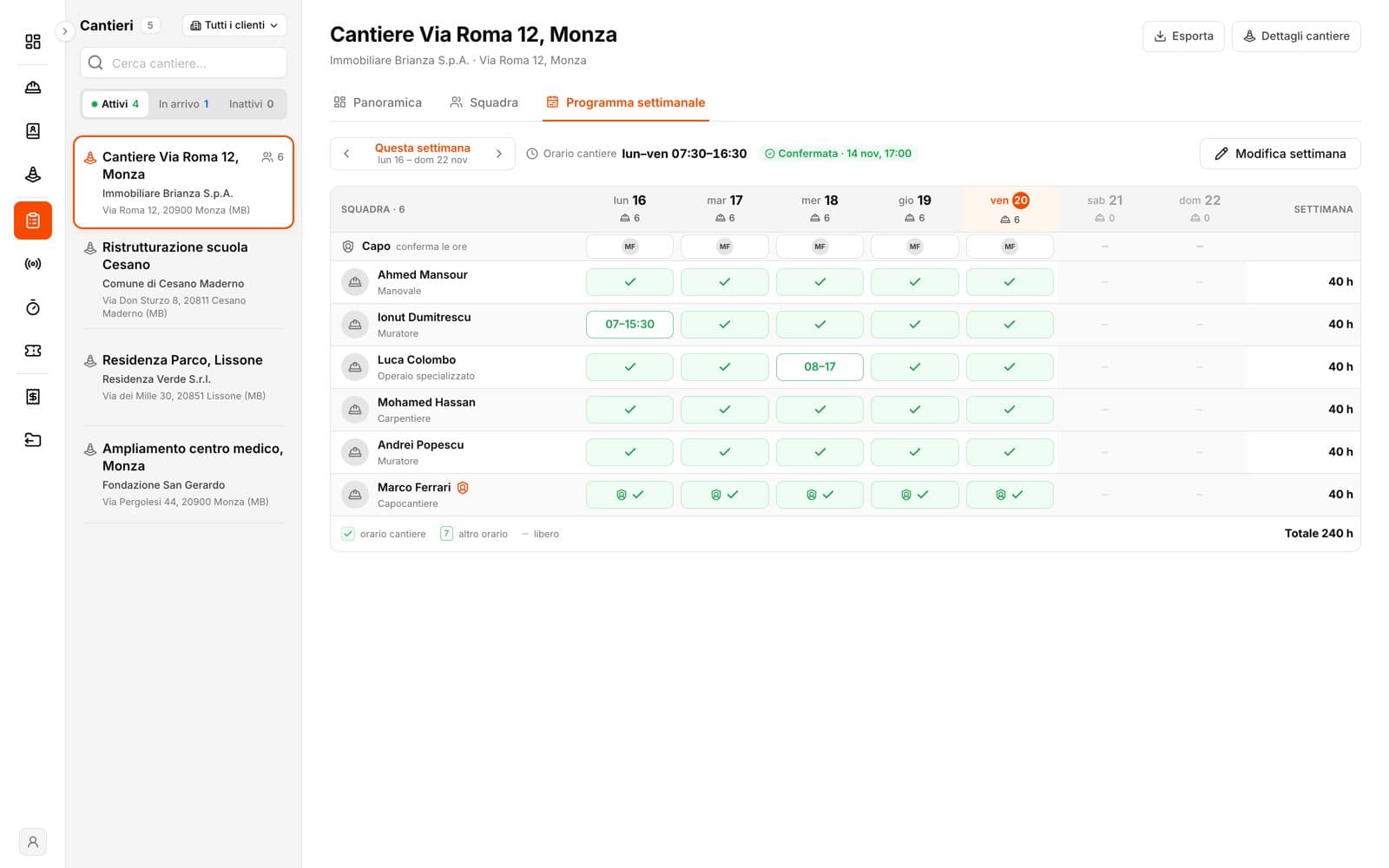
Team planning and work schedules
Assigning workers and supervisors to sites on a weekly schedule, with the option to share the team line-up with the client for electronic approval.
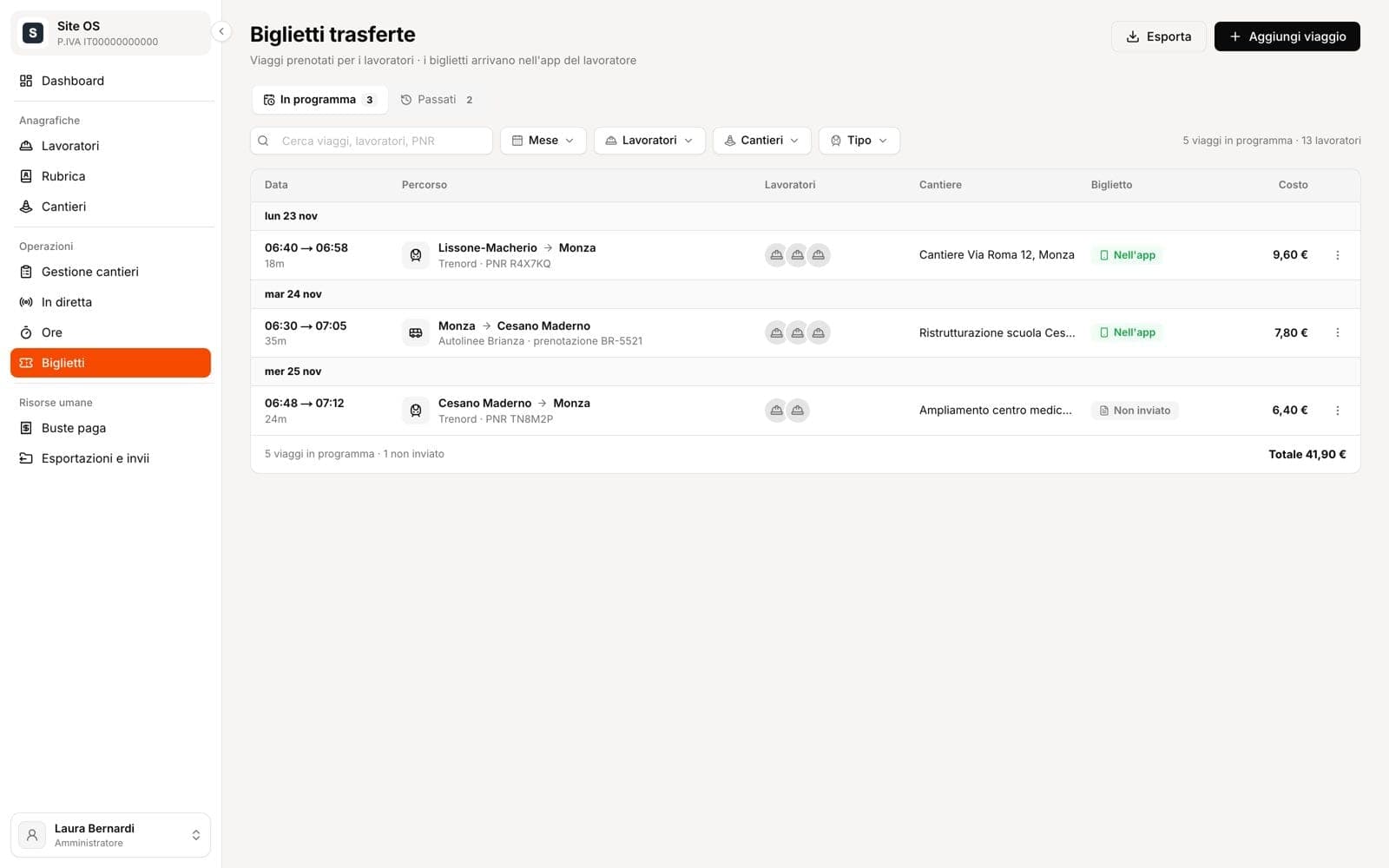
Worker travel management
Linking travel and transport tickets to work sites, and giving workers their trip details directly in the app.
AI document reading
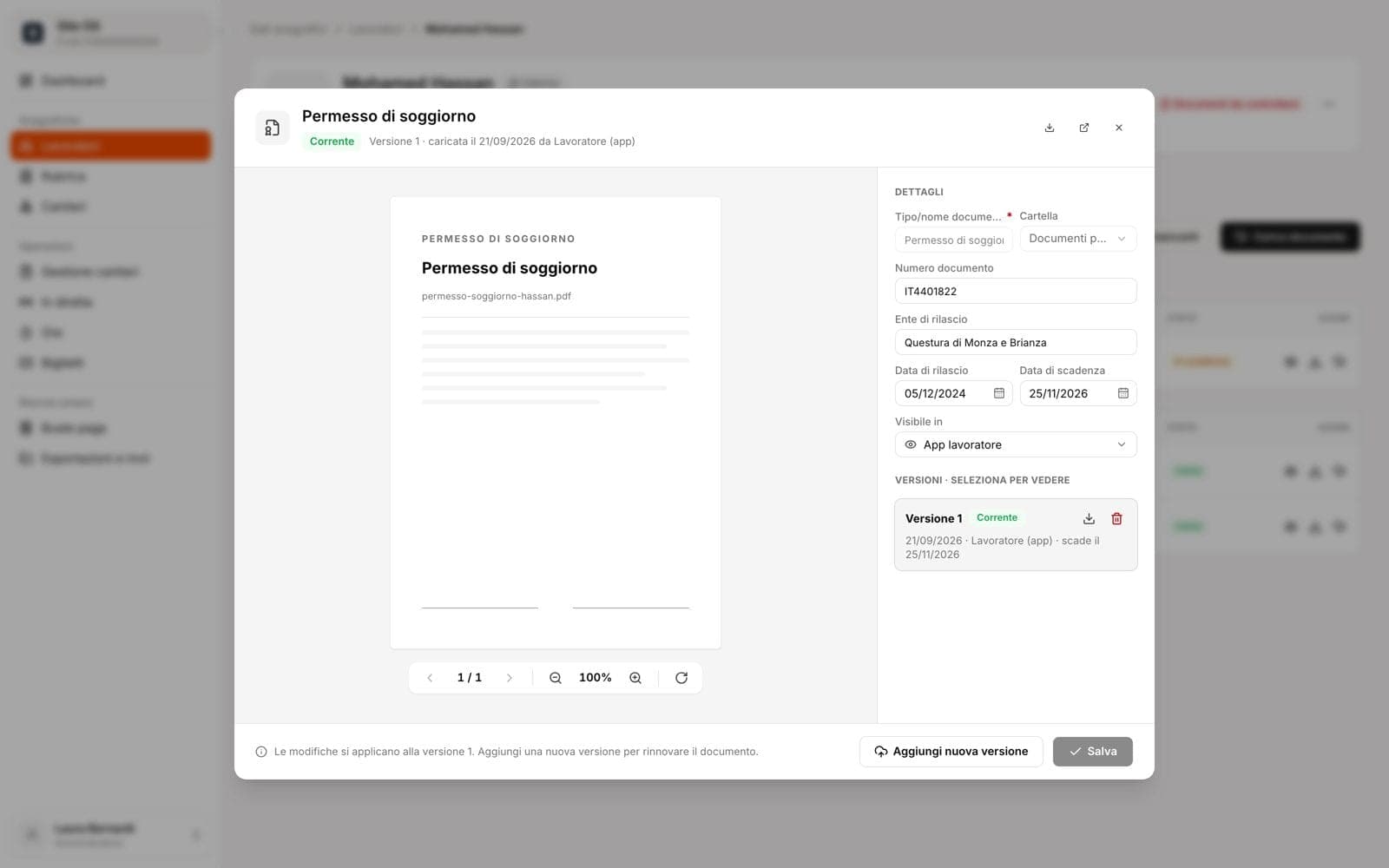
The system extracts data from supported documents and adds it to worker files, instead of re-entering the information by hand.
Document expiry tracking
Tracking missing documents and those close to expiry, and requesting updated documents from workers through the app.
AI payslip matching
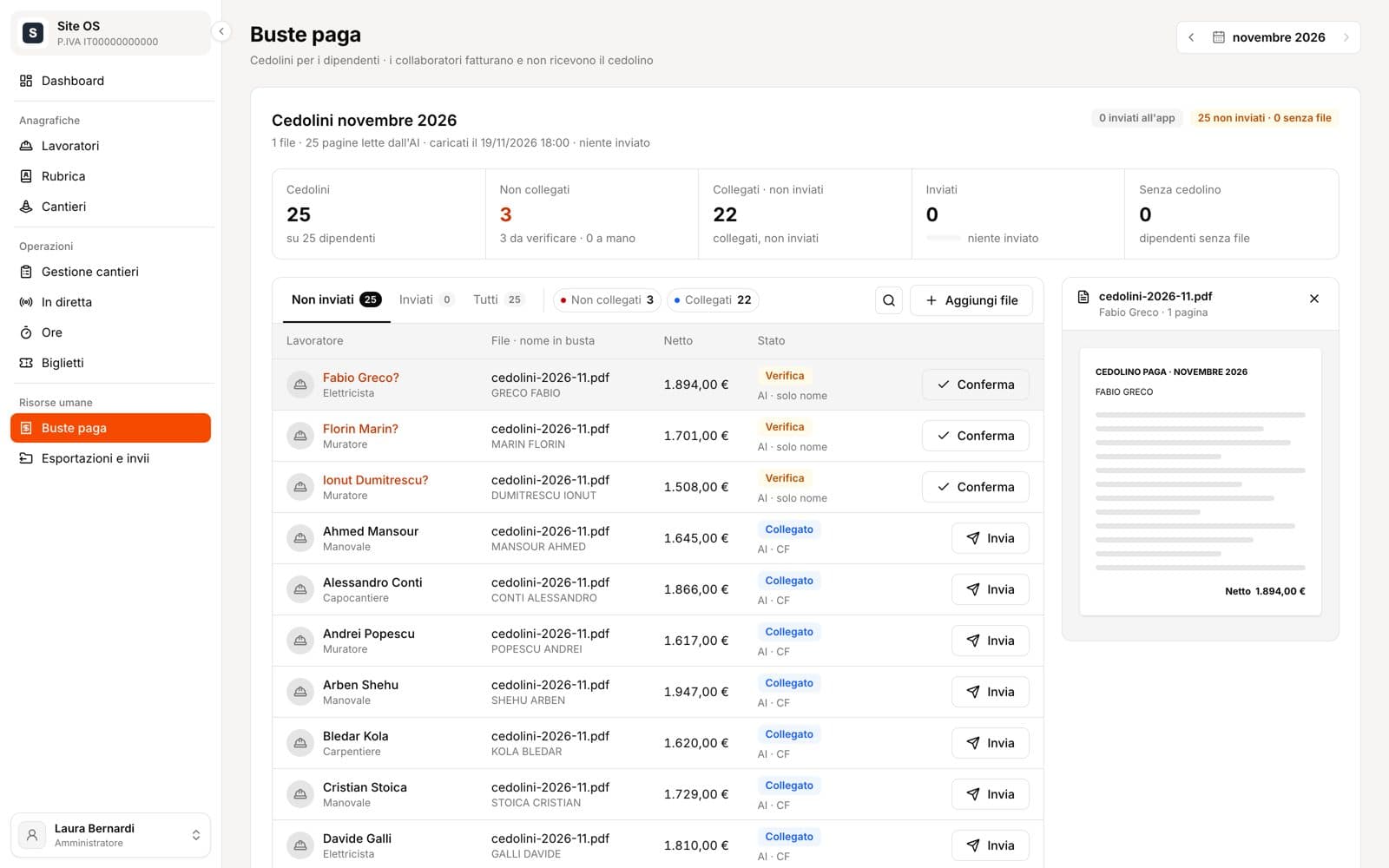
The system analyzes payroll files and identifies the worker linked to each payslip, referring uncertain cases to the office for review.
Reviewing working hours and preparing payroll
Reviewing working hours by worker, day and site, approving them and exporting sheets in Excel, PDF and CSV.
With solutions like this
6 hours
saved every week by the site supervisor on payroll-related admin work.
Does your company need a similar system?
How did we build the solution?
Connecting the site with the office
We designed the system so that site teams, the office and clients work within one integrated digital environment.
Central document management
We built an archive that links documents to projects, clients and workers, with file organization and version management.
An app designed for field work
An app for iOS and Android devices that supports offline clock-in and automatic sync when the connection returns.
AI document processing
We integrated document reading, data extraction and matching with worker records to reduce manual entry.
Verifying attendance at work sites
Setting the geographic boundaries of each site and verifying attendance with GPS or NFC.
Document sharing and team approval
Making shared documents available to clients, and reviewing and approving proposed teams electronically.
Business impact
The figures below come from published experiences with similar solutions and are shown for comparison.
6 hours
saved every week by the site supervisor on payroll-related admin work.
-50%
Less administrative work after digitizing timesheets and site forms.
≈0
Number of overtime disputes after recording the time and location of each clock-in.
2 weeks
Time from contract signing to the system running at all sites, in one of the cases.
Development and expansion options
Labor cost monitoring
Comparing actual working hours with planned hours for each site.
Integration with ERP and payroll systems
Connecting approved hours, overtime and absences to the company’s systems.
Leave and absence management
Receiving requests from the app and handling them through approval procedures.
Managing subcontractor companies and teams
Tracking external teams, their documents and their assignment to projects, with permissions and approvals managed through the platform.
Frequently asked questions
Does the system support managing technical and project documents?
Yes. Site OS lets you organize technical, administrative, client and worker documents, link them to the relevant sites and projects, and manage file versions.
Can the system be customized to our company’s needs?
Yes. The system can be adapted to the company’s procedures, user permissions and the way it manages projects.
Does it integrate with payroll and ERP systems?
It supports exporting approved working hours, and direct integration with the company’s systems can be developed.
Does the app work without an internet connection?
Yes. The app saves clock-ins and sends them when the connection returns.
Does the app support multinational teams?
Yes. The app is currently available in Arabic, English and Italian, and other languages can be added according to the workers’ nationalities and the company’s needs.
Show more questions (7)
Where is the data stored?
A dedicated instance can run on a cloud account in the company’s name, with data ownership set out in the contract.
How long does it take to get the system running?
It depends on the number of sites and workers and the customizations required.
Does it support external workers?
Yes. Employees, external workers and collaborators can be managed, along with their documents and assignments.
Who handles support and updates?
The digitalH team develops and maintains the system under the service agreement.
How is attendance verified?
With GPS within the site boundaries, or with NFC.
How is document expiry tracked?
The system shows documents that are close to expiry and lets you request updates.
Can the client approve the team electronically?
Yes. The client can review the team and the shared documents and approve the team through a private link.
Do you need a better way to manage your projects?
We study with you how you manage work sites, technical documents, clients and teams, and develop an integrated system that suits the nature of your projects and connects field operations with the office.
Next project

PlaceX