Operation and maintenance, services, retail, industry and logistics
Workly
A smart platform for workforce management and AI shift planning.
Employees, workers, clients, branches, work sites, shifts, attendance and documents managed in one digital system. Workly uses AI to plan shifts and assign the workforce according to operational needs and employee availability, while letting management follow field operations and working hours from a central dashboard.

- Industry
- Operation and maintenance, services, retail, industry and logistics
- Services
- Business systems development
- AI and operations automation
- Platforms
- Cloud dashboard
- Mobile app for employees
- API
The problem to solve
As organizations grow and add branches, projects and clients, managing the workforce, assigning employees to sites and tracking shifts and working hours become some of the biggest operational challenges. These processes grow more complex when they rely on Excel spreadsheets, correspondence and manual procedures.
Does your organization face these problems too?
Shift schedules prepared by hand for each branch and site.
Many communication channels and schedules updated inconsistently.
Absences, lateness and staff shortages at sites spotted too late.
Difficulty finding replacement employees to cover shifts.
Clashing shifts and overlapping employee assignments.
Working hours changed with no clear record of the changes.
Overtime not tracked before payroll is prepared.
Working hours entered again and again for payroll and client invoices.
Who is Workly designed for?
Companies and organizations with multiple branches
Managing employees, work schedules and attendance across all branches.
Warehouses and logistics companies
Planning shifts and assigning workers to warehouses and logistics centers.
Facility management and cleaning companies
Organizing the assignment of field teams to client sites and tracking operating hours.
Security and guarding companies
Managing shifts and assigning security staff to sites and guard posts.
Retail companies and chains
Organizing employee working hours and assigning the workforce across branches and stores.
Hotels and hospitality
Planning shifts and coordinating staff assignments across departments and services.
Contracting, operation and maintenance companies
Managing technical and field teams and assigning them to projects and client sites.
Factories and industrial plants
Planning production shifts and assigning workers to departments and production lines.
Packaging and contract manufacturing companies
Organizing the workforce and assigning employees to operating lines according to work requirements.
How does the system work?
Managing clients, branches and work sites
A complete file for each client and site that brings together the organization’s data, location, operating hours, contract documents and the employees assigned to work there.

Employee and document management
A digital file for each employee that brings together their job data and documents, with tracking of expiry dates and search and filter options.

With solutions like this
7
admin modules for managing employees, clients, sites, shifts and operations.
Shift planning and work schedules
Preparing weekly schedules for employees according to the needs of branches, projects and clients, with the option to edit, review and approve schedules before publishing.


AI workforce planning
AI analyzes site needs, operating hours and employee availability, and suggests a shift allocation that helps management organize the workforce, with review and approval before it is applied.
Clock-in and clock-out from the phone
The employee records the start of work, breaks and the end of the shift in the app, with the location verified and the option to work without an internet connection.


Reviewing and approving working hours
Tracking actual working hours for each employee and site, and reviewing, correcting and approving records before they are used in financial and administrative procedures.
With solutions like this
2
languages currently: English and Italian, with the option to add Arabic, Urdu, Hindi, Bengali and others according to the organization’s needs.
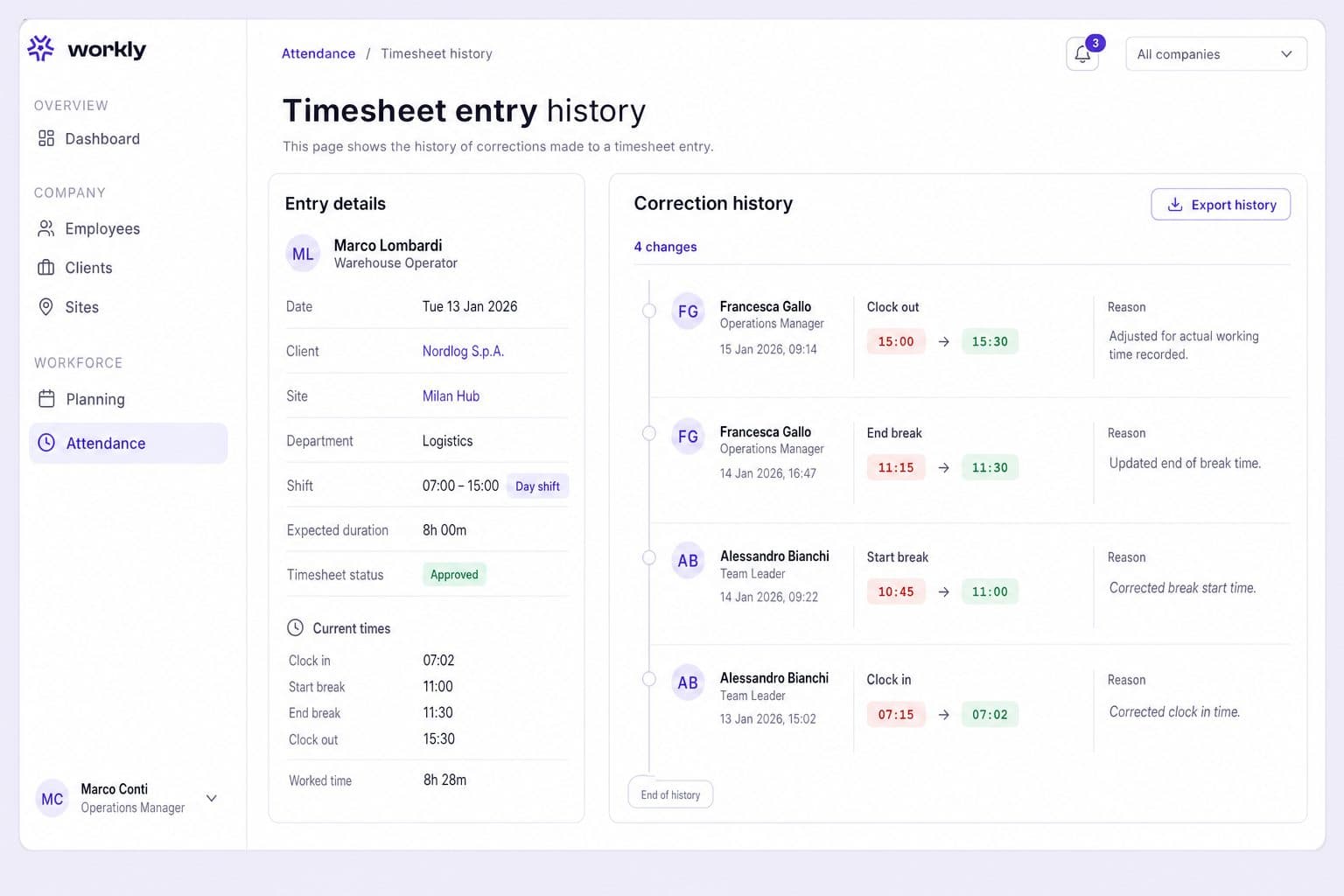
Control and change log
Recording every change made to attendance records and working hours, showing who made each change and when.
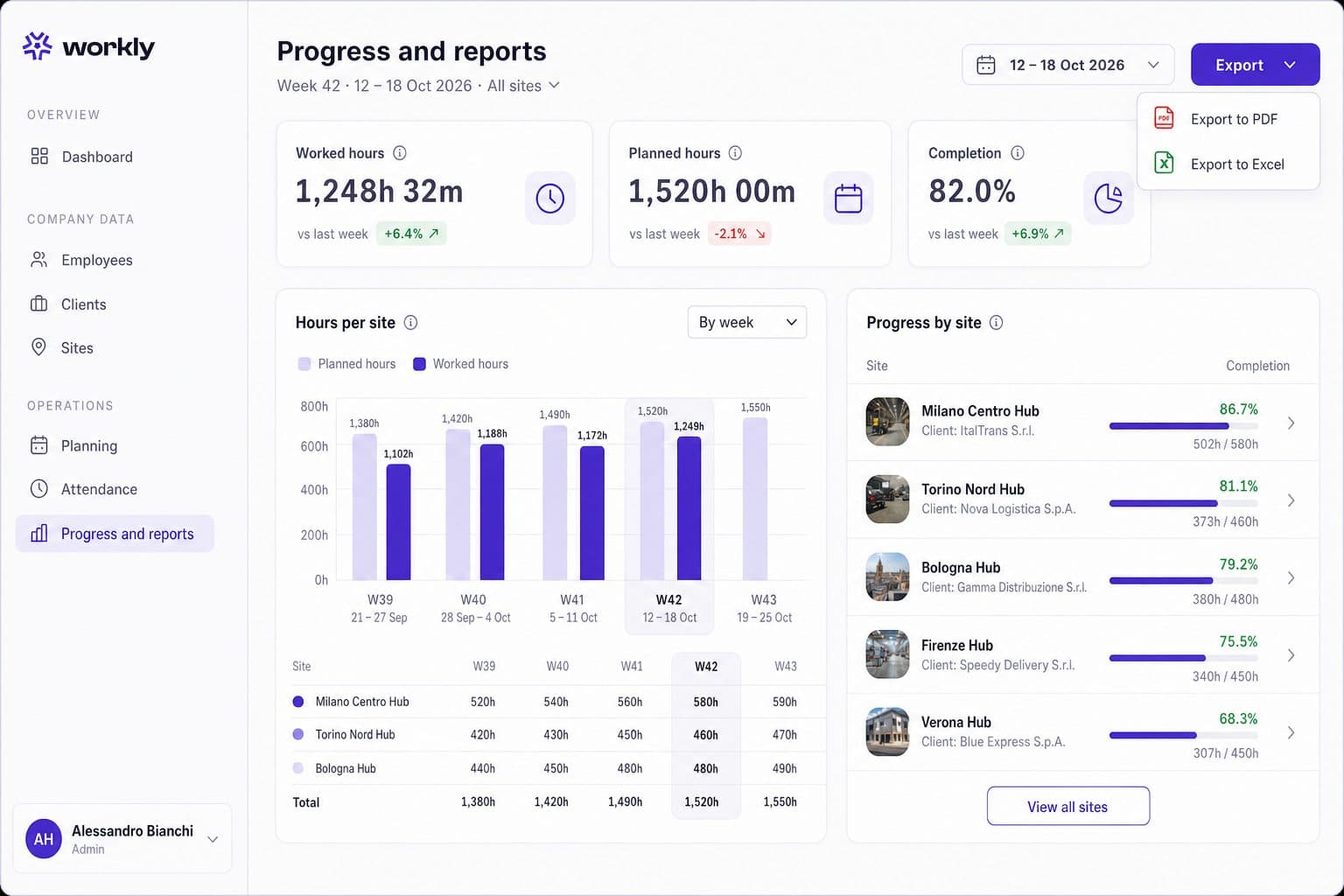
Performance indicators and operational reports
Analytical dashboards for tracking planned and actual working hours and how the workforce is spread across projects and clients, with reports and data that can be exported.
Does your organization need an integrated workforce management system?
How did we build the solution?
Designing the system around operational needs
We studied how organizations that run multiple teams work, and how they assign employees and shifts to branches, projects and client sites.
AI in human resources management
We built AI into shift planning and employee assignment, to cut the time spent preparing schedules and make better use of available resources.
A unified system for planning and execution
We connected work schedules, attendance and actual working hours in one system, to reduce duplicated work and improve data accuracy.
A dashboard and an employee app
We developed dedicated interfaces for management, HR and field teams, so everyone works on the same data.
The platform in numbers
Product figures, calculated from the code itself.
7
admin modules for managing employees, clients, sites, shifts and operations.
2
languages currently: English and Italian, with the option to add Arabic, Urdu, Hindi, Bengali and others according to the organization’s needs.
~50
API integration points for managing site, employee, shift and attendance data.
1
unified work record linking planned shifts, clock-in and clock-out, and actual working hours.
Development and expansion options
Handling staff shortages with AI
Suggesting available employees to cover shifts when there is an absence or a staff shortage, according to the site’s needs and available resources.
Detecting shift clashes and overtime
Detecting clashes in work schedules and flagging overtime before it is approved.
Shift swaps from the phone
Letting employees submit shift swap requests and having them reviewed and approved electronically.
Organizing working hours and breaks
Setting rules for working hours, breaks and overtime according to the organization’s policies and the requirements of the Labor Law in the Kingdom.
Managing leave, short-leave permissions and absences
Managing requests, balances and approvals and linking them directly to workforce planning.
Smart alerts and notifications
Sending notifications to employees and managers when shifts are approved or changed, or when cases come up that need follow-up.
Integration with HR and payroll systems
Developing direct connections with HRMS, ERP and payroll systems to exchange approved working hours, overtime and absences.
Monitoring workforce costs
Calculating labor and shift costs and comparing them with project and branch budgets and client contracts.
AI detection of operational irregularities
Analyzing attendance records to detect unusual cases, clock-ins outside planned times, or shifts that were not closed.
An AI assistant for management
Developing a smart assistant that lets management ask direct questions about overtime, workforce allocation, project costs and performance indicators, and get answers based on the organization’s data.
Frequently asked questions
Is the system suitable for organizations that run several branches and projects?
Yes. Workly is designed to manage a workforce spread across several branches, sites and clients, and to organize shifts from a central dashboard.
Does the app work at sites with weak coverage?
Yes. The app saves clock-ins, clock-outs and breaks on the phone and syncs them automatically when the connection returns.
How are working hours reviewed and corrected?
Management can review, edit and approve attendance records, with a log of changes kept and the option to export the data.
Can the system be connected to HR and payroll systems in the Kingdom?
Yes. Integration can be developed with the systems the organization uses, depending on the available interfaces and business requirements.
Is the system suitable for a multinational workforce?
Yes. New languages can be added to the app according to the nationalities of employees and workers and the organization’s needs.
Looking for a smart system to manage your organization’s workforce?
We study with you how you manage employees, shifts, branches and projects, and develop an integrated system based on AI and business automation to improve workforce planning, raise operational efficiency and keep track of costs.
Next project

Stocky